Snowflake Interview Questions and Answers for Data Engineers (2026)
Sixteen real Snowflake questions asked in Indian services, GCC, and product-company data engineering rounds — with answers that explain the why behind micro-partitions, Time Travel, Snowpipe, and credit costs, not just definitions.
By Durgesh Yadav — Senior Data Engineer @ 7-Eleven · Updated 19 Oct 2026. Preparation guidance, not a hiring guarantee.
What are the most asked Snowflake interview questions?
Indian data engineering interviews focus on Snowflake's three-layer architecture (storage, compute, cloud services), virtual warehouse sizing, micro-partitions and clustering keys, Time Travel, zero-copy cloning, Snowpipe, and streams plus tasks. Expect scenario questions on query performance, caching layers, and credit cost control — interviewers want you to explain trade-offs, not just define features.
Services companies screen with SnowPro-style fundamentals plus strong SQL; GCCs and product companies go deeper into internals, cost scenarios, and pipeline design. Most loops pair Snowflake with dbt, Airflow, or a cloud-platform round, so keep your orchestration story ready.
Round 1: SQL plus fundamentals — architecture, warehouses, Time Travel
Round 2: scenarios — slow-query triage, Snowpipe vs COPY, streams and tasks
When do you resize a Snowflake warehouse, and when do you add clusters?
Read the Query Profile first. Spilling to local or remote storage means the query is starved and a bigger size is the fix; queued time in query history means concurrency, so scale out. We split workloads into separate warehouses when loads, dashboards and ad hoc analysis start fighting over the same credits.
Size fixes a slow query; clusters fix a queue
Dimension
Resize the warehouse
Multi-cluster warehouse
Separate warehouses
Symptom it fixes
One query spills or runs too long
Queries queue at peak concurrency
Workloads fight over shared compute
What changes
More compute per query
More clusters of the same size
Isolated compute per workload
Single slow query
Usually faster
Unchanged; it still runs on one cluster
Unchanged unless the new warehouse is bigger
Scales on its own
No, you resize by hand or by task
Yes, between the min and max cluster count
No, each is sized separately
Edition needed
Standard
Enterprise or higher
Standard
Evidence to quote
Spilling in Query Profile
Queued time in query history
Different SLAs or cost owners
Which Snowflake concepts must you explain without hesitation?
Interviewers test whether you understand why Snowflake behaves the way it does — immutable micro-partitions explain pruning, cloning, Time Travel, and expensive updates all at once. Tie every feature back to the storage model and you will sound senior.
Micro-partitions and metadata-based partition pruning
Separation of storage and compute — and what each is billed for
The three caches and when each one saves you a warehouse resume
How do scenario and cost questions separate seniors?
Beyond definitions, senior rounds present a symptom — a slow dashboard, an exploding credit bill — and expect a diagnostic path. Practise narrating Query Profile reads and credit trade-offs out loud, ending each answer with how you would verify the fix.
Spilling → warehouse sizing → query rewrite, in that order
Resource monitors, auto-suspend, and transient tables for cost control
Snowpipe Streaming plus dynamic tables for near-real-time designs
For the Databricks and Snowflake round
Experienced Data Engineering Interview Kit 2026
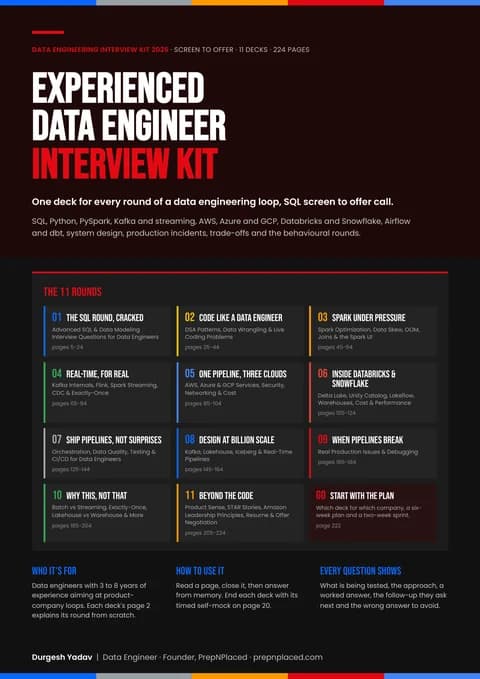
Deck 06, Inside Databricks & Snowflake, covers the databricks and snowflake round. Most Indian product and services teams run on one of these two platforms, and their interviews go deep on it. How each works inside, how to load and model data on it, how to secure it, and how to keep the bill under control.
Real questions from beginner to advanced, each with a concise model answer — practice them, then rehearse live in a mock interview. Every answer is open; collapse any you have already covered.
EasyExplain Snowflake's three-layer architecture.
Snowflake separates cloud services, query processing, and database storage. The services layer handles parsing, optimisation, metadata, transactions, and security; query processing runs on virtual warehouses — independent MPP compute clusters; storage is compressed columnar micro-partitions in cloud object storage (S3, Azure Blob, or GCS). Because the layers are decoupled, compute and storage scale and bill independently, and multiple warehouses can read the same data without contention.
EasyWhat is a virtual warehouse, and what happens when you resize one?
A virtual warehouse is a named cluster of compute nodes that executes queries and DML; sizes run XS to 6XL, with each step doubling the nodes and the credits per hour (XS burns 1 credit/hour). Resizing is near-instant because no data lives on the warehouse — new nodes simply start reading micro-partitions from the storage layer. Auto-suspend and auto-resume stop billing the moment a warehouse goes idle.
EasyWhat are micro-partitions in Snowflake?
Micro-partitions are immutable columnar storage units holding roughly 50–500 MB of uncompressed data, created automatically on load — you never manage them directly. For every column in every micro-partition, Snowflake stores metadata such as min/max values, distinct counts, and null counts. The optimiser uses this metadata for partition pruning, scanning only micro-partitions that could contain matching rows.
EasyWhat is Time Travel and how far back can you go?
Time Travel lets you query, clone, or restore past data using AT/BEFORE clauses and recover dropped objects with UNDROP. Retention is controlled by DATA_RETENTION_TIME_IN_DAYS: 1 day by default, up to 90 days for permanent tables on Enterprise edition and above. After Time Travel expires, data enters Fail-safe — 7 non-configurable days recoverable only via Snowflake support.
EasyWhat is zero-copy cloning and where do teams use it?
CREATE TABLE dev_orders CLONE prod.orders creates a metadata-only copy pointing at the same micro-partitions, so it completes in seconds with no extra storage cost at creation. Because micro-partitions are immutable, any later change writes new micro-partitions owned by the clone (copy-on-write), and only those deltas are billed. Teams use it to spin up full-size dev/test environments and instant pre-release backups.
MediumWhen should you define a clustering key, and how do you verify it is working?
Add a clustering key only on large multi-terabyte tables where queries filter or join on a column that does not match the natural load order — for example, event data loaded by time but queried by customer_id. Verify with SYSTEM$CLUSTERING_INFORMATION and SYSTEM$CLUSTERING_DEPTH, and confirm in the Query Profile that partitions scanned drops. Automatic clustering is a background serverless service that burns credits, so the pruning benefit must outweigh the recluster cost.
MediumExplain Snowflake's three caching layers.
The result cache in the cloud services layer returns a previous result for 24 hours if the query text is identical and the underlying data unchanged — no warehouse needed. The warehouse (local disk) cache keeps recently read micro-partitions on the compute nodes' SSDs and is lost on suspend. The metadata cache answers queries like COUNT(*), MIN, and MAX directly from micro-partition statistics without resuming any compute.
MediumHow does Snowpipe work, and how is it different from COPY INTO?
Snowpipe is serverless continuous ingestion: a cloud event notification (for example S3 → SQS) or a REST call tells the pipe a new file landed, and Snowflake loads it on its own compute, billed per second plus a per-file overhead, with roughly minute-level latency. COPY INTO is a batch command running on your own warehouse and is cheaper for large scheduled loads. For seconds-level, row-level ingestion, Snowpipe Streaming writes rows over a channel API without staging files at all.
MediumHow do streams and tasks combine to build incremental pipelines?
A stream is a CDC offset on a table exposing rows changed since the last consumption, with METADATA$ACTION and METADATA$ISUPDATE columns; consuming it inside a committed DML advances the offset. A task is scheduled SQL or a stored procedure (CRON or interval) chained with AFTER into a DAG. The standard pattern is a task guarded by WHEN SYSTEM$STREAM_HAS_DATA('my_stream') running a MERGE from the stream into the target — the warehouse never resumes when there is nothing to process.
MediumScale up or scale out — when do you resize a warehouse versus go multi-cluster?
Scale up to a bigger size when individual queries are slow or spilling — each size doubles memory and parallelism per query. Scale out with a multi-cluster warehouse (min/max cluster counts) when queries are fast individually but queue under concurrency, like a BI dashboard at 9 am. Auto-scale adds clusters on queueing and retires them when idle; Economy mode conserves credits while Standard mode starts clusters more eagerly.
MediumA Query Profile shows 'bytes spilled to remote storage'. What does that mean and how do you fix it?
Spilling means an operation — usually a large sort, join, or aggregation — exceeded warehouse memory, writing first to local SSD and then to remote object storage; remote spilling can slow a query by an order of magnitude. Fix it by running on a larger warehouse, filtering earlier with pruning-friendly predicates, eliminating exploding joins caused by duplicate keys, and splitting monster CTAS statements into stages.
MediumHow do you control Snowflake costs in production?
Set resource monitors with credit quotas that notify and then suspend warehouses; keep auto-suspend aggressive (60 seconds) with auto-resume on, and right-size separate warehouses per workload instead of one shared giant. Track spend through ACCOUNT_USAGE views like WAREHOUSE_METERING_HISTORY and QUERY_HISTORY to find expensive queries. On the storage side, watch Time Travel and Fail-safe bloat on high-churn tables — staging tables should be transient so they skip Fail-safe entirely.
HardHow does Snowflake provide ACID transactions on immutable storage?
Every DML writes new micro-partitions instead of modifying files; a commit is an atomic metadata operation in the cloud services layer that swaps the table's file list to the new version. Readers work from a consistent snapshot of that metadata, so they never block and never see partial writes — this same versioning powers Time Travel and cloning. Concurrent writes to the same table coordinate through partition-level locking, so conflicting DML queues rather than corrupting state, with READ COMMITTED isolation.
HardWhy are frequent single-row UPDATEs expensive in Snowflake, and what is the better pattern?
Because micro-partitions are immutable, updating one row rewrites the entire micro-partition containing it — a single-row update can rewrite hundreds of megabytes, and the old version lingers in Time Travel storage. OLTP-style trickle updates therefore inflate both compute and storage. The better pattern is batching changes and applying one MERGE per interval, capturing deltas with streams, and keeping churn-heavy staging data in transient tables with minimal retention.
HardDesign near-real-time ingestion from Kafka into curated Snowflake tables.
Use the Snowflake Kafka connector with Snowpipe Streaming to land rows in a raw table with seconds-level latency and no file staging. Put a stream on the raw table and either a task running MERGE into the curated layer, or declare curated tables as dynamic tables with TARGET_LAG = '1 minute' so Snowflake manages incremental refresh. Keep the raw table transient, monitor lag via SYSTEM$STREAM_HAS_DATA and connector offsets, and dedicate a warehouse to transformation so BI concurrency never starves ingestion.
HardCompare permanent, transient, and temporary tables and their impact on storage billing.
Permanent tables get up to 90 days of Time Travel on Enterprise plus 7 days of Fail-safe; transient tables cap Time Travel at 1 day and skip Fail-safe; temporary tables live only for the session and also skip Fail-safe. On high-churn tables the difference is dramatic: every rewritten micro-partition is retained for the full Time Travel plus Fail-safe window, so a churny permanent staging table can bill several times its live size. Standard design: transient for staging and intermediate layers, permanent only where point-in-time recovery genuinely matters.
By company
Analytics Engineer interviews that ask these questions
See how this topic shows up in real Analytics Engineer loops — rounds, difficulty and company-specific questions:
Is SnowPro certification worth it for Indian data engineering roles?
SnowPro Core helps most at services companies like TCS, Infosys, and LTIMindtree, where certifications are tagged to client billing and shortlisting. GCCs and product companies weight hands-on scenario answers far more. Do the cert if your employer reimburses it, but one concrete story about cutting warehouse credits or building a streams-and-tasks pipeline beats it in interviews.
How much hands-on Snowflake experience do interviewers expect?
At 2–4 years of experience, expect fundamentals plus solid SQL — architecture, warehouses, Time Travel, and loading. At 5+ years, rounds shift to scenario, design, and cost questions. A free 30-day Snowflake trial account is enough to practise everything in this list, including Snowpipe, cloning, and clustering.
What salary can Snowflake data engineers expect in India?
This page quotes no pay figures. PrepNPlaced's India Tech Hiring Report found that fewer than 300 of its postings disclosed an INR salary, too few to publish honestly. Experience and company type set the scale, and Snowflake usually appears alongside dbt or Airflow in the JD. Engineers who can talk credit governance and cost optimisation credibly negotiate from a stronger position.
Should I learn Snowflake or Databricks first?
Learn the one your target companies use: SQL-warehouse-centred analytics stacks favour Snowflake, while Spark- and ML-heavy stacks favour Databricks. The core ideas transfer — both separate storage from compute and both offer time travel on versioned data. Most Indian JDs accept either as the cloud data platform skill.
Next Step
Turn The Guide Into Practice
Use PrepNPlaced tools to turn this learning path into resume proof, targeted practice, and interview-ready explanations.