Visible browser
Runs in a supervised browser so the process stays transparent and user-controlled.
Run a supervised Naukri application workspace with saved answer memory, resume variants, visible browser control, and application logs.
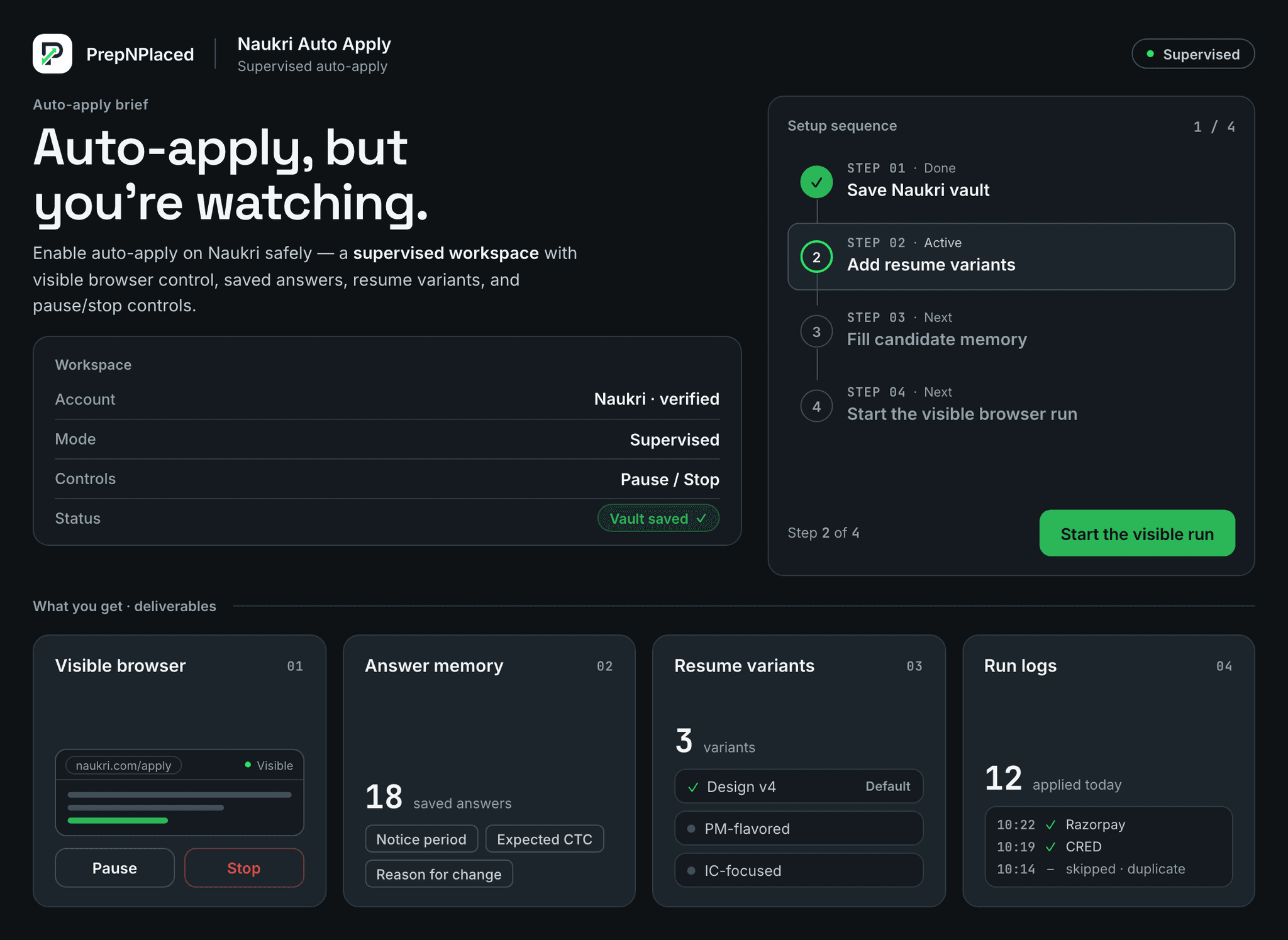
Naukri Auto Apply on PrepNPlaced opens Naukri in a visible browser you can watch, fills each application from your saved answers and the resume variant you chose, and logs every action. You set the daily cap (25 applies a day on the free two-day trial), pause or stop at any point, and nothing is submitted with an answer you did not confirm. Open Auto Apply, pick a resume variant and start the first supervised run.
Why you can trust it
Everything below is what the tool actually does — with clear limits, guardrails, and the next step always visible.
Runs in a supervised browser so the process stays transparent and user-controlled.
Reuses saved candidate facts for repeated recruiter questions.
Lets users prepare the most relevant resume version for each role family.
Keeps a reviewable trail of actions, external links, pauses, stops, and outcomes.
How it works
Each step below is what actually happens, in order — so you always know what comes next.
Save Naukri vault
Add resume variants
Fill candidate memory
Start the visible browser run
Deep dive
A closer look at what this workspace does — and how each part helps you move faster.
The Naukri Auto Apply workspace uses a visible browser mode and focuses on internal Naukri flows so the candidate can observe the run.
A one-time Answer Vault (education scores, CTC, notice period, per-skill ratings, interview availability) answers recruiter popups with the candidate's real facts — unknown skills answer honestly instead of being inflated, and anything uncertain is queued for a one-tap confirmation that is remembered forever. Skill questions adapt to the candidate's role family, from developers and QA to finance, HR, sales, and operations.
Start with a reviewed resume variant, confirm your saved profile facts, then run the visible browser workflow while watching the application queue.
The practical sequence is simple: prepare the resume, save verified candidate facts, connect the Naukri session, choose the role filters, start the visible browser, and review each application outcome. The candidate should be able to pause whenever a question needs judgment.
Naukri and Naukri Pro do not include a true one-click auto-apply that answers recruiter questions for you — Pro mainly adds recruiter reach, profile visibility, and search perks. To actually auto-apply on Naukri, you connect your Naukri login to the PrepNPlaced Naukri Auto Apply workspace, fill your Answer Vault once, choose your role and location filters, and start the visible browser run. It works the same whether your Naukri account is free or Naukri Pro — Pro just means more of your applications get seen.
People search for a Naukri auto apply bot, a Chrome extension, or a GitHub script — and all three exist. A browser extension runs inside your own Chrome with permissions over every tab, and its quality depends entirely on who published it. A GitHub bot means putting your Naukri password into someone else's script and letting it submit applications you never see; that is how accounts get flagged. PrepNPlaced takes a third route: a supervised workspace where a visible browser fills each application from your saved answers while you watch. Nothing installs into your browser, nothing runs blind, and every recruiter question is answered from facts you confirmed — so the speed of a bot without handing your account to one.
Manual Naukri apply gives full control but is slow. Blind automation is risky because it can submit weak matches or unsupported answers. A supervised workflow aims for speed while keeping the browser visible and the candidate responsible for final decisions.
Before running Naukri automation, confirm that resume variants are honest, saved answers are accurate, job filters are relevant, and the process can be stopped. External recruiter questions should be reviewed instead of guessed.
People searching for Naukri auto apply usually want to save time, but the safer answer is not blind mass submission. The safer answer is a supervised workflow that keeps filters, resume variants, answers, and review logs visible.
The run should stop or pause when the role is a poor match, the question requires human judgment, the external link leaves Naukri, or the saved answer is not confident enough to use.
PrepNPlaced does provide a supervised visible-browser workflow for Naukri preparation and review. It does not blindly submit sensitive answers, invent profile facts, or apply to roles you would not review yourself.
Questions
Straight answers to the questions people ask most before getting started.
Connect your Naukri login to the PrepNPlaced Naukri Auto Apply workspace, fill your Answer Vault once (education, CTC, notice period, skills), pick your role and location filters, then start the visible browser run. PrepNPlaced applies to matching Naukri jobs and answers recruiter popups from your saved facts while you watch.
Naukri Pro does not include a true auto-apply that answers recruiter questions for you — it mainly adds recruiter reach and profile visibility. PrepNPlaced adds the actual supervised auto-apply layer, and it works the same on free and Naukri Pro accounts.
The steps are identical whether you use a free Naukri account or Naukri Pro: connect Naukri to PrepNPlaced, complete your Answer Vault, set your job filters, and start the visible browser run. Naukri Pro simply means more of the applications you send are seen by recruiters.
It is safe when it is supervised. PrepNPlaced runs in a visible browser you can pause or stop at any time, never inflates answers, auto-refuses scam questions (PAN, bank, pay-to-apply), and keeps a log of every application — so you stay in control of your own Naukri account.
Free gives a 2-day taste of 25 applications a day. Job Seeker allows 40 a day and Pro Auto-Pilot 75 a day, applied to your matched, low-competition jobs first.
We have not found a published daily application limit on Naukri itself; applying is free and the site shows no counter. The limit that matters is relevance, because a recruiter who sees the same profile on forty unrelated postings stops opening it. That is why PrepNPlaced caps its own supervised runs by plan (25, 40 or 75 applications a day) and applies to your matched jobs first, instead of everything that loads.
Yes. Your one-time Answer Vault answers repeated recruiter popups (CTC, notice, scores, skills) with your real facts. Anything uncertain is queued for a one-tap confirmation and remembered for next time.
No. You set the role, location, and keyword filters, and the run applies only to matches. It pauses on poor-fit roles and hands external company-site links back to you for manual review.
No — and the difference matters. Blind bots submit applications you never see and can get accounts flagged. PrepNPlaced runs a supervised workspace: a visible browser fills each application with your saved answers while you watch, and you can pause or stop at any point. Nothing is submitted behind your back.
Open the Naukri Auto Apply workspace and use the pause, stop, or hard-stop control — it halts the run instantly. Because you connect your own Naukri session and the browser stays visible, you are always in control; there is no background process left running after you stop.
From your saved Answer Vault and learned answers first, then a one-tap confirmation queue for anything uncertain — falling back to AI assistance only when needed. Nothing is invented.
Extensions exist on the Chrome store, but PrepNPlaced is deliberately not one. An extension runs inside your browser with permissions over every open tab, and you are trusting whoever published it. PrepNPlaced runs as a supervised workspace instead: you connect your Naukri session, a visible browser does the applying, and nothing gets installed into your own Chrome. It also means it works from any browser or laptop, not just the one carrying the extension.
If you can read the code and accept the risks, that is your call — but know what they are: the script holds your Naukri password, it submits applications you never review, and it answers recruiter questions with whatever it was hardcoded to say, which is how profiles end up flagged or filled with wrong answers. PrepNPlaced's free trial gives you the same speed with a visible browser, your own verified answers, and a log of every application — no code, no password in a script.
Next workflow
Keep moving through the connected workflow without losing the target role context.
Find Jobs
Find and rank jobs first.
Resume Score
Check resume before applying.
Job Search Hub
Read the full responsible job-search workflow.
Jobs Matched to Your Resume
Prioritize the roles that best match your resume.
See plans and pricing
The free tier needs no card. Paid plans are one payment for 1, 3 or 6 months, and nothing renews.
Visible browser
Answer memory
Resume variants
Run logs